
Smart Phone or Dedicated Barcode Scanner?
Phone Camera vs. Dedicated Barcode Scanner: Which Do You Need?
Can a phone replace a barcode scanner?
A smartphone camera can read a barcode, and for a few dozen scans a day in a clean office it works fine. A dedicated barcode scanner decodes in milliseconds from several feet away, survives being dropped on concrete, and runs a full shift on one charge. The question isn’t whether phones can scan — it’s at what volume the gap between “can” and “should” starts costing you money. For most operations that number is lower than people expect.
Where phone scanning actually holds up
Phones are the right tool in a specific set of situations, and pretending otherwise is just selling hardware.
Occasional scanning — a few items an hour, not a few hundred — is fine on a phone. Checking in a delivery of six boxes, confirming an asset tag during an office audit, scanning a QR code on a work order. The per-scan time penalty doesn’t add up to anything when there aren’t many scans.
Field and customer-facing work where carrying a second device is awkward. A sales rep who scans a product in a customer’s showroom twice a week doesn’t need a rugged scanner on their belt.
Pilot projects and proof-of-concept. If you’re testing whether barcoding a process is worth it at all, phones let you find out without buying equipment you might not keep.
Very small operations with a handful of SKUs and no time pressure. A workshop tracking 40 part numbers on a shelf does not need a $600 scanner.
Where it breaks down
Speed per scan
A dedicated imager decodes the instant the barcode is in its field of view — typically well under 100 milliseconds, with an aiming pattern that shows the operator exactly where to point. A phone has to open the camera, autofocus, wait for the decode library to find and read the symbol, and confirm. Two to four seconds per scan is typical in real use, and it gets worse in poor light or with slightly damaged labels.
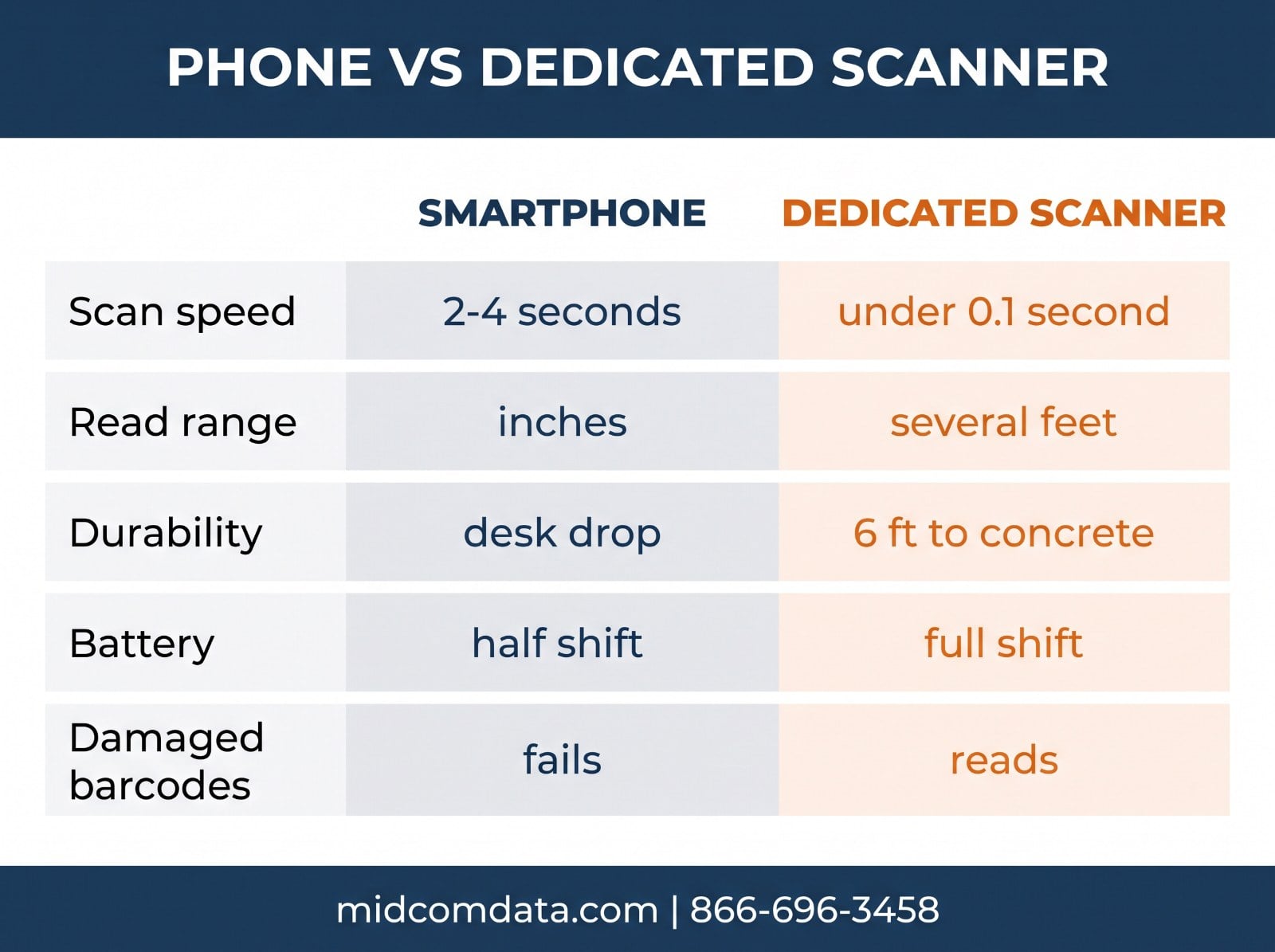
Multiply that difference across a picker doing 800 scans a shift and you’ve lost somewhere between 25 and 50 minutes per person per day. That’s the whole argument in one number.
Range and angle
Phone cameras need the barcode close and roughly square to the lens. Standard-range dedicated scanners read from a few inches to several feet; extended-range models read rack labels from 30 feet or more. A picker scanning a location label at the top of a rack can’t do that with a phone without climbing.
Damaged and low-contrast barcodes
Dedicated imagers run aggressive decode algorithms designed for scuffed, wrinkled, and faded labels. Phone decode libraries are tuned for clean QR codes on screens. When the label is marginal, the phone is the device that fails first — and marginal labels are normal in a warehouse.
Durability
Consumer phones are rated for a drop or two onto a desk. Industrial scanners are rated for repeated drops to concrete from five or six feet, plus dust and water ingress (IP65 or better is standard). A phone in a rugged case is more durable than a bare phone, but the case does nothing for the camera lens scratches that slowly degrade scan performance, and nothing for the battery.
Battery
Running the camera continuously is one of the heaviest loads you can put on a phone. A phone used as a primary scanner through a full shift will need a mid-day charge, which means either a spare phone or downtime. Dedicated scanners are built around a full shift of scanning. Our post on scanner battery life covers what to expect from purpose-built hardware.
Ergonomics
Holding a phone flat and steady while tapping a screen is a two-handed job. A pistol-grip scanner with a trigger is one hand, and the other hand stays free to move product. Over a shift, that difference shows up in both throughput and repetitive strain.
The hidden costs of bring-your-own-device
The phone-as-scanner case often rests on “we already have phones.” That ignores several things that cost money once you’re relying on them operationally.
Device management. Personal phones run whatever OS version, have whatever apps installed, and leave when the employee does. Company-owned phones solve that but then you’re buying devices anyway — and a consumer phone bought for scanning costs about the same as an entry-level dedicated scanner, with none of the durability.
Data and app control. Scan data on a personal device is scan data you don’t control. Wiping a departing employee’s phone isn’t something most companies can do.
Support burden. Fifteen different phone models with fifteen camera behaviors is a support problem. One scanner model configured identically across the fleet is not.
Replacement cost. A cracked phone screen costs more to fix than a cracked scanner window, and the phone is out of service while it’s being repaired. Dedicated scanners are also repairable — MIDCOM Data Technologies operates express depot repair centers for exactly this, and a repaired scanner comes back as good as new.
The middle ground: enterprise mobile computers
There’s a category between phones and gun-style scanners that’s often the right answer: the rugged mobile computer. Devices like the Zebra TC52 or TC58 look and work like a phone — Android, touchscreen, apps — but add a dedicated scan engine with an aiming pattern, a trigger button, a hot-swappable battery, and a drop spec. You get the phone’s flexibility with the scanner’s speed and durability.
These cost more than a phone and more than a basic scanner, but they replace both. If your workflow needs an operator to scan and look at a screen — confirming a pick, entering a quantity, reading instructions — a mobile computer is usually more efficient than a phone, and more efficient than a scanner paired to a separate tablet. Our guide on choosing a rugged mobile computer covers what to look for.
Running the numbers
The decision comes down to scan volume and what a slow or failed scan costs.
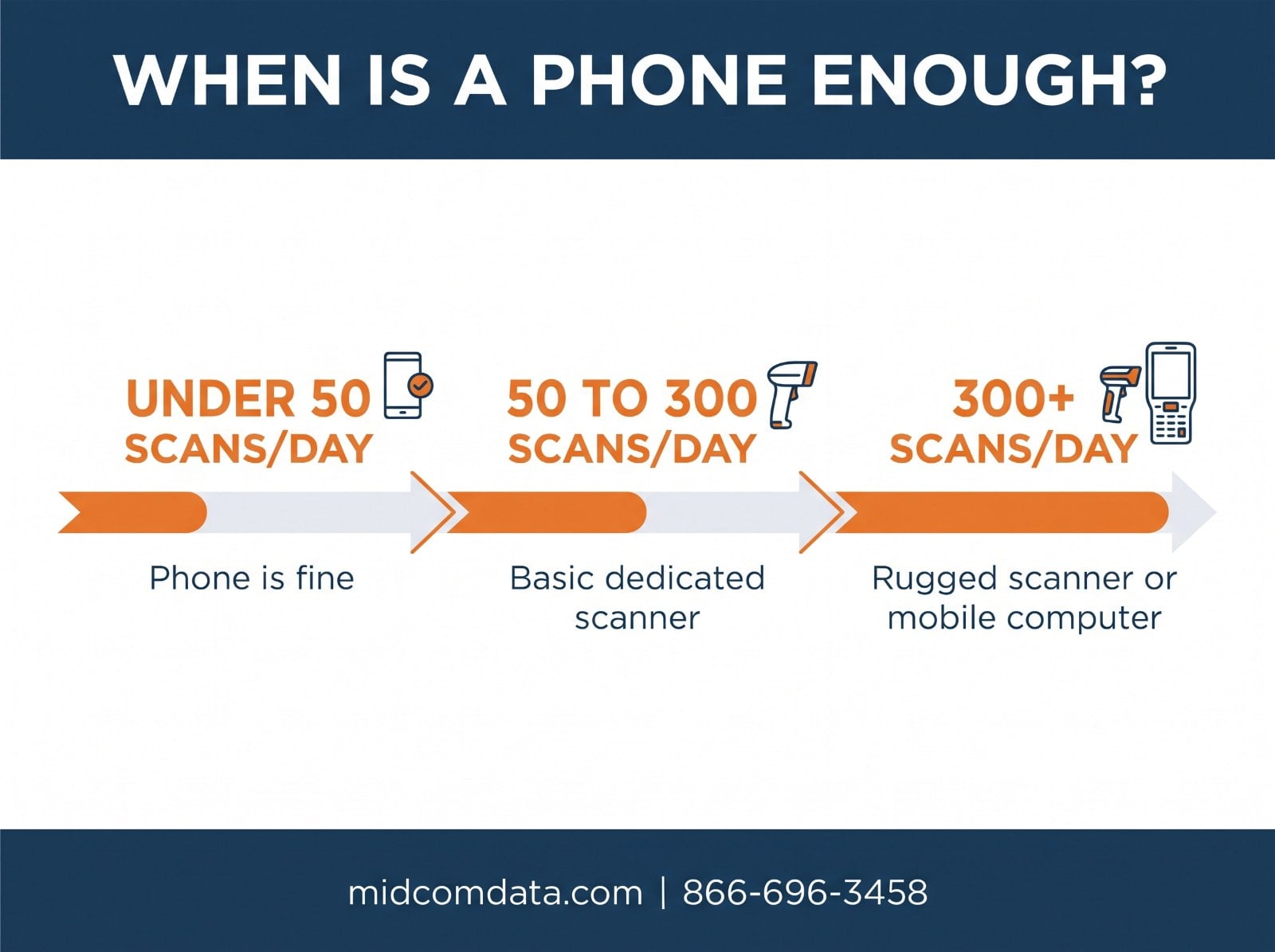
Under about 50 scans per person per day, in a controlled environment, with no time pressure: phones are probably fine.
From 50 to a few hundred scans a day: a basic corded or cordless scanner pays for itself in weeks through saved time alone, before counting durability.
Above a few hundred scans a day, or anywhere with rack heights, damaged labels, or rough handling: dedicated hardware is the only option that works reliably, and a rugged mobile computer is worth considering if operators also need a screen.
A simple way to test it: time ten scans on a phone and ten on a dedicated scanner, for the labels and conditions you actually have. Multiply the difference by your daily scan count and your labor rate. That’s the annual cost of the phone.
MIDCOM Data Technologies carries barcode scanners and rugged mobile computers from Zebra, Honeywell, and Datalogic, and we can loan demo units so you can run that test with your own labels. Call 866-696-3458 or request a quote.
Frequently asked questions
Can I use my phone as a barcode scanner for inventory?
Yes, for low-volume use — a few dozen scans a day in good lighting with clean labels. Phones struggle above that because each scan takes two to four seconds versus a fraction of a second on a dedicated scanner, and they fail on damaged, faded, or distant barcodes that purpose-built imagers read without trouble.
How much faster is a dedicated barcode scanner than a phone?
A dedicated imager decodes in well under 100 milliseconds once the barcode is in view, with an aiming pattern to guide the operator. A phone typically takes two to four seconds per scan including camera launch and autofocus. Across 800 scans per shift, that difference is 25 to 50 minutes of lost time per operator per day.
What is the difference between a rugged mobile computer and a phone?
A rugged mobile computer like the Zebra TC52 runs Android and works like a phone, but adds a dedicated scan engine with an aiming pattern, a physical trigger, a hot-swappable battery, and a drop rating to concrete. It’s built for a full shift of scanning in an industrial environment, which a consumer phone is not.
Are phone barcode scanner apps reliable for warehouse use?
Not for production scanning. Phone decode libraries are tuned for clean QR codes on screens, not scuffed or faded warehouse labels. They also can’t scan at rack-label distances, drain the battery quickly under continuous camera use, and require two hands. They’re fine for occasional checks and pilot projects.
When does buying a dedicated scanner pay for itself?
Usually within weeks once you’re above roughly 50 scans per person per day. The time saved per scan, multiplied by daily volume and labor rate, typically exceeds the cost of an entry-level scanner in the first month or two — before counting the durability and reliability advantages.